

♥ Wishlist
Our experts reviewed the latest {category_name } to help you compare quality, performance, durability and overall value before making your purchase.





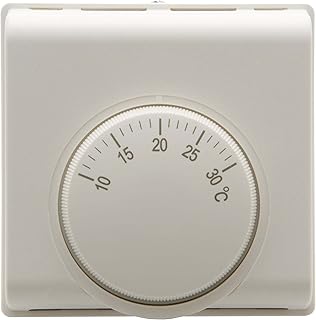


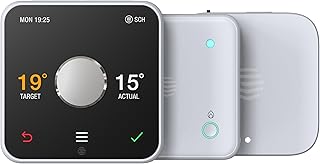


Choosing a thermostat is no longer simply a matter of selecting a device that raises or lowers the heating temperature. Modern heating controls can differ substantially in how they sense temperature, schedule heating, communicate with a boiler or heat pump, integrate with other controls and allow you to manage your home remotely. The right choice therefore depends on the heating system, property layout, household routine and level of automation you actually need. For UK households, it is particularly important to distinguish between a thermostat, a programmable thermostat, a smart thermostat and a complete heating-control system. A visually appealing smart thermostat is not automatically the best option if it is incompatible with the existing heating installation or cannot provide the control arrangement your home requires. This additional buying guidance focuses on the practical details that are easy to overlook when comparing thermostats: compatibility, control zones, temperature sensing, installation, scheduling, connectivity, usability, energy management, reliability and long-term ownership. A basic room thermostat provides straightforward temperature control. It monitors the temperature around the thermostat and signals the heating system when heat is required according to the configured temperature setting. This type can make sense for households that want simple operation without smartphone controls, cloud services or extensive automation. The main buying considerations are compatibility, temperature control, ease of adjustment and correct positioning. Programmable thermostats add scheduled heating periods. Instead of manually changing the temperature throughout the day, you can establish a routine that reflects when the property is normally occupied. When comparing programmable models, look beyond the number of schedule periods advertised. Check how easy it is to alter individual periods, whether different days can have different programmes and whether temporary overrides are simple to cancel. Smart thermostats generally add app-based control, connected services and more sophisticated scheduling or automation. Depending on the system, you may be able to adjust heating while away from home, create heating routines, manage multiple zones or connect heating controls with other smart-home devices. Smart functionality is useful only when it improves everyday control. A complicated system with numerous settings may be less convenient than a simpler thermostat if the household mainly needs reliable scheduled heating. Wireless thermostats can offer greater flexibility when deciding where the temperature sensor should be located. This can be especially useful when the ideal control position is not immediately beside the boiler or when a wired thermostat would require additional installation work. Wireless does not necessarily mean completely installation-free. The thermostat still needs to communicate with compatible heating controls, and some systems use a separate receiver or hub. Multi-zone systems allow different areas of a property to be controlled separately where the heating installation supports appropriate zoning. This can be valuable in larger homes, properties with distinct occupancy patterns or households where bedrooms, living areas and other spaces are used at different times. Do not assume that purchasing several individual thermostats automatically creates independent heating zones. The boiler, valves, wiring, receivers and control system must all support the intended arrangement. One of the most common thermostat-buying mistakes is choosing a model based primarily on appearance or smart-home features before checking whether it is suitable for the heating system. Before comparing prices, identify the type of heating system installed in the property. Relevant information can include the boiler type, heating configuration, hot-water arrangement, existing programmer, receiver, zone valves and any additional heating controls. If you cannot identify the existing arrangement, photographing the current thermostat, programmer, boiler controls and receiver can be useful when obtaining compatibility advice. The model number of the boiler and existing controls may also be important. Not all thermostats communicate with a heating appliance in the same way. A basic control arrangement may effectively request heat or stop requesting heat, whereas compatible systems can use more sophisticated communication to influence how the heating appliance operates. Where modulation or a digital heating protocol is supported, compatibility must be assessed as a complete system rather than by looking at the thermostat alone. A thermostat may advertise advanced control capabilities, but the practical benefit depends on the boiler, receiver and installation supporting the relevant communication method. OpenTherm is one example of a communication standard used with compatible heating equipment. However, support for a particular protocol should always be checked against the exact boiler and thermostat models rather than assumed from the product category. A thermostat can only control heating effectively if the temperature it measures is representative of the area you want to keep comfortable. This makes sensor placement one of the most overlooked factors in thermostat performance. A thermostat located beside a radiator, in direct sunlight, close to a frequently opened external door or in a draughty position may experience conditions that do not represent the average temperature of the room. The most sophisticated thermostat cannot compensate fully for a poorly chosen sensing location. In a multi-room property, it is also worth considering whether one central thermostat accurately represents the comfort requirements of the rest of the home. Remote control allows heating settings to be changed from a smartphone or compatible device. This can be useful when plans change, when a property is left empty unexpectedly or when you want to alter the heating before returning home. When comparing apps, consider practical usability rather than simply whether remote control exists. Check whether schedules are easy to edit, whether temperature adjustments are obvious and whether important functions remain accessible without navigating through multiple menus. A good scheduling system should accommodate real household routines. Look for flexible weekday and weekend programming, straightforward temporary overrides and an easy way to copy settings between days where appropriate. Some connected heating systems can use location or presence information to influence heating behaviour. These features can reduce the need for manual changes when household routines vary, but they should not be treated as a substitute for checking the underlying schedule. Some heating systems can identify temperature changes associated with an open window and temporarily adjust heating behaviour. The exact implementation varies, so this should be regarded as a convenience feature rather than a guarantee that heat loss will be prevented. Certain smart thermostats attempt to adapt heating behaviour around household routines. The appeal is reduced manual programming, but buyers should still consider whether they prefer predictable schedules or automated behaviour that can change according to detected patterns. A dedicated holiday or away setting can simplify longer periods when normal heating schedules should not operate. This is particularly useful when the alternative would be manually editing several daily programmes and remembering to restore them afterwards. The UK market includes established heating-control manufacturers alongside smart-home brands. Brand familiarity can be useful, but it should never replace checking model-specific compatibility and functionality. These brands should be compared at model level rather than treated as interchangeable. A brand may offer several thermostat types with significantly different installation requirements, connectivity options and control capabilities. Product comparison tables can contain many technical fields, but not every specification has equal importance. The following criteria are particularly useful when creating a shortlist. This should normally be the first filter. Eliminate products that cannot be installed correctly with your heating arrangement before comparing design or smart features. Determine whether the thermostat provides simple switching, modulation through a compatible protocol, or another form of heating control. The most advanced specification is not automatically the most suitable. Check whether the thermostat is wired, wireless or part of a system requiring a separate receiver. Installation complexity can differ considerably between products. Thermostats may use different power arrangements. Some rely on batteries, while others require a permanent electrical connection or another supplied power source. Consider both installation and ongoing maintenance. Connected models may use different communication technologies and may require a hub or bridge. Check what is included and whether the home network meets the product requirements. If independent control is important, confirm the maximum supported zones and the additional equipment required. Do not assume that one thermostat can control every desired area independently. Some heating installations require separate domestic hot-water management. If hot water is part of your existing control arrangement, check whether the proposed thermostat supports the relevant functions or whether another controller remains necessary. Consider compatibility with the smart-home ecosystem you already use. A thermostat that works with your preferred voice assistant or automation platform may be considerably easier to integrate than a technically capable product that operates in isolation. A clear display can be more important than expected. Consider whether temperature information is readable from a normal standing position, whether physical controls are easy to operate and whether the thermostat remains usable if the smartphone app is unavailable. Check whether installation is intended for a qualified heating professional, electrician or competent installer. The exact requirements depend on the heating system and the thermostat. A smart thermostat is not automatically a better purchase than a programmable model. The difference is primarily about the level of connectivity and automation required. For a household with a predictable routine, simple scheduling can be perfectly adequate. For people whose working patterns change frequently, connected controls may provide greater convenience. The value of a smart thermostat depends on how much you will actually use its additional capabilities. Remote control can be useful, but paying for advanced connectivity makes less sense if the thermostat will rarely be adjusted outside a fixed schedule. The strongest case for a smart thermostat usually comes when several benefits combine: variable occupancy, remote access, multiple heating zones, convenient scheduling and integration with other connected devices. Buyers should also consider the long-term dependence on apps, cloud services and account-based functionality. A product can be technically impressive while becoming less convenient if essential controls are unnecessarily complicated. In a compact property with relatively consistent occupancy, simple programmable control may provide all the functionality required. A smart thermostat can still be worthwhile where remote access or smart-home integration is particularly useful. Terraced homes may benefit from carefully positioned temperature sensing because different rooms can have noticeably different thermal characteristics. Consider whether a single control point represents the main living area adequately. Larger properties can make zoning more relevant. If bedrooms, living spaces and other areas are used at different times, independent heating control may offer greater practical flexibility than a single thermostat. Households with shift work, hybrid working, frequent travel or changing schedules can benefit from easily adjustable programming and remote access. In these situations, app-based control can be more valuable than it would be for a household with a highly predictable routine. Older systems require particular care during compatibility checks. Do not assume that replacing an old thermostat with a modern smart model is a simple like-for-like upgrade. The existing wiring, controls and heating architecture may affect which products are suitable. Installation requirements are often underestimated when comparing headline product prices. The thermostat itself may be only one component of the overall installation. Depending on the product and existing system, installation can involve a thermostat, receiver, hub, bridge, wiring changes, valves or other control components. The required work varies by property and product. Professional installation is particularly important where electrical connections, boiler controls, heating-system wiring or zone valves are involved. If you are unsure about the existing wiring or compatibility, obtain advice before purchasing rather than attempting to make the product fit after delivery. When comparing thermostats, therefore, consider the total ownership proposition rather than the thermostat's purchase price alone. The ideal location depends on the home's layout and the heating zone being controlled. Installation guidance for the specific thermostat should take precedence over generic positioning advice. A thermostat is a control device rather than a source of heat. Its contribution to energy management comes from controlling when heating operates and the temperature at which it is requested. Good scheduling can help avoid heating an unoccupied property unnecessarily, while sensible temperature settings can reduce demand compared with maintaining an unnecessarily high indoor temperature. However, the overall energy performance of a home also depends on insulation, ventilation, windows, boiler or heat-pump efficiency, heating-system design and household behaviour. It is therefore misleading to judge a thermostat solely by claims about potential savings. Actual results depend on how the system is configured and how the property is used. For homes using gas or other boiler-based central heating, compatibility between the thermostat and boiler controls is central to the buying decision. The same thermostat can offer a very different proposition depending on whether the heating appliance can use its advanced control functions. Before purchasing, establish whether your boiler uses the control method required by the thermostat and whether the existing programmer or receiver needs to be replaced or retained. Heat-pump systems should be assessed separately from conventional boiler installations. Their control requirements can differ, and the best thermostat strategy may depend on the specific heat pump, system design and emitter arrangement. If the property uses an air-source or ground-source heat pump, confirm compatibility directly with the heat-pump manufacturer and thermostat documentation. Avoid assuming that a thermostat designed for a conventional boiler will provide the appropriate control behaviour for a heat-pump system. The mobile application can become the main interface for a smart thermostat, so it deserves the same scrutiny as the physical device. Read recent customer feedback alongside the technical specifications when assessing app usability, paying particular attention to recurring comments about connectivity, setup and everyday operation rather than isolated complaints. Connected heating products can involve user accounts, app permissions, network connectivity and information about household routines. Before buying, review the manufacturer's privacy information and understand what information the product requires to provide its connected functions. It is also sensible to check whether the product can continue providing basic local heating control if the internet connection is unavailable. Internet-dependent features and core thermostat operation are not necessarily the same thing. A low purchase price is irrelevant if the thermostat cannot operate correctly with the existing heating system. A stylish display can be appealing, but compatibility, control method and installation requirements matter more than aesthetics. Smart-home compatibility and heating-system compatibility are separate considerations. Always check the exact installation requirements. Some connected thermostats are part of a wider ecosystem. Confirm which components are supplied and which are required separately. If your existing heating controls also manage domestic hot water, establish exactly what happens to those functions after the thermostat is installed. Advanced automation has value only when it solves a genuine problem. Extra features that are never used can add complexity without improving the household's experience. Consider installation, additional components, batteries where applicable, connectivity requirements and any optional services when assessing long-term value. A useful comparison starts by separating essential requirements from desirable features. This prevents impressive specifications from distracting you from the factors that determine whether a thermostat will actually work in your home. Customer reviews are most useful when interpreted alongside technical information. A high average rating does not necessarily mean a product is suitable for a particular heating system. Look for repeated feedback concerning installation, connectivity, temperature sensing, app usability, schedule management and reliability. Give more weight to reviews from customers with a similar heating configuration and property type. Reviews can also reveal practical details that specifications rarely communicate, such as whether routine temperature adjustments are intuitive or whether setup requires more preparation than expected. Thermostats generally require little routine maintenance, but connected systems benefit from occasional checks. If temperature readings appear inconsistent with the conditions in the room, investigate placement and the manufacturer's troubleshooting guidance before assuming that the thermostat itself has failed. The best thermostat is the one that provides the right level of control for the heating system and household rather than the one with the longest feature list. For simple scheduled heating: prioritise compatibility, reliable temperature sensing and an easy-to-use programme. For remote control: prioritise app quality, connectivity and straightforward remote temperature adjustment. For larger homes: investigate zoning and whether the heating installation can support independent control. For smart-home users: check compatibility with the wider ecosystem before committing to a thermostat. For older heating systems: place compatibility and installation requirements ahead of smart features. For irregular schedules: prioritise flexible programming, temporary overrides and convenient remote management. There is no single best thermostat for every UK home. The right choice depends on the heating system, property layout, number of zones, household routine, desired smart-home features and installation requirements. Start with compatibility, then compare the features that you will actually use. Not necessarily. Smart thermostats offer additional connectivity and automation, but a conventional programmable thermostat can be a better fit for a household that mainly wants dependable scheduled heating. No. Thermostats have different compatibility and installation requirements. The exact boiler, existing controls, wiring and communication method should be checked before purchasing. A thermostat can help manage heating more effectively through scheduling and control, but savings are not guaranteed and cannot be attributed to the thermostat alone. Property insulation, heating-system efficiency, temperature settings and household behaviour all influence energy consumption. It can control a heating system configured around a single control zone, but one thermostat does not automatically provide independent room-by-room control. Separate zones require compatible heating infrastructure and appropriate controls. Wireless communication between thermostat components is not necessarily the same thing as internet connectivity. Some wireless thermostats communicate locally with a receiver, while smart systems may also use Wi-Fi or another network connection for remote app features. A thermostat primarily manages temperature, while a programmer generally controls when heating or hot water is scheduled to operate. Modern systems can combine these functions or provide them through connected control ecosystems. It can be important when both the thermostat and heating appliance support the relevant communication standard. The key point is to confirm compatibility with the exact equipment rather than assuming that any thermostat advertising advanced control will work with every boiler. A touchscreen can provide an attractive and flexible interface, but it is not inherently better than physical controls. Consider readability, responsiveness and how easily you can make everyday temperature changes. Very important. The thermostat uses its sensor to determine the temperature around it, so placing it near a heat source, draught or strong source of sunlight can produce an unrepresentative reading. Not automatically. Newer products may offer additional features, but an established model that is compatible with your system and provides the controls you need can be a more sensible choice. Product specifications, compatibility information, software features and market availability can change. For a buying guide, recommendations should therefore be reviewed periodically, with model-specific specifications checked before purchase. The strongest thermostat shortlist is built from the heating system outward. First establish what your boiler, heat pump and existing controls can support. Next decide whether you need one zone or several, simple scheduling or smart automation, local control or remote access. Only then should design, brand preference and price become major comparison factors. When comparing models from brands such as Google Nest, Hive, Tado, Drayton Wiser, Honeywell Home, Netatmo, Salus and EPH Controls, compare the exact products rather than relying on brand reputation alone. Specifications, installation requirements and supported heating configurations can differ between models within the same range. Before purchasing, verify the current manufacturer's specifications, installation guidance and compatibility information, then compare verified customer feedback and current retailer pricing. Taking these steps helps avoid one of the most expensive thermostat mistakes: buying a sophisticated control system that does not suit the heating installation or household routine.
Thermostat Buying Guide: What to Look For Before You Buy
Thermostat Types Explained
Basic Room Thermostats
Programmable Thermostats
Smart Thermostats
Wireless Thermostats
Multi-Zone Heating Controls
Compatibility Is the First Buying Check
Questions to Ask About Your Existing System
OpenTherm, Modulation and On/Off Control
Temperature Accuracy and Sensor Placement
Where Should a Thermostat Be Positioned?
Smart Thermostat Features Worth Comparing
Remote App Control
Heating Schedules
Geolocation and Presence Features
Open-Window Detection
Learning and Adaptive Scheduling
Holiday and Away Modes
Popular Thermostat Brands to Compare
Thermostat Comparison: The Specifications That Matter
1. Heating-System Compatibility
2. Control Method
3. Wiring Requirements
4. Power Supply
5. Connectivity
6. Number of Zones
7. Hot-Water Control
8. App and Smart-Home Integration
9. Display and Physical Controls
10. Installation Requirements
Smart Thermostat vs Programmable Thermostat
Is a Smart Thermostat Worth It?
Thermostats for Different Types of Home
Small Flats and Apartments
Terraced Houses
Larger Detached Homes
Homes with Irregular Occupancy
Older Heating Installations
Thermostat Installation: What Buyers Should Know
When Professional Installation Makes Sense
Thermostat Placement Mistakes to Avoid
Energy Efficiency: What a Thermostat Can and Cannot Do
Heating Controls for Boiler Systems
Heating Controls for Heat Pumps
Thermostat App and User Experience
What Makes a Good Heating App?
Privacy and Connected-Home Considerations
Common Thermostat Buying Mistakes
Choosing the Cheapest Model Without Checking Compatibility
Buying for Appearance
Assuming Every Smart Thermostat Works with Every Boiler
Ignoring the Receiver or Hub
Forgetting About Hot Water
Assuming More Features Mean Better Value
Comparing Only the Initial Price
How to Compare Thermostats Like an Expert
How to Read Thermostat Customer Reviews
Questions to Ask Before Buying a Thermostat
Thermostat Features: Essential vs Nice to Have
Usually Essential
Often Useful
Potentially Unnecessary
Maintenance and Long-Term Care
How to Choose the Best Thermostat for Your Needs
Thermostat Comparison Checklist
Frequently Asked Questions About Thermostats
What is the best thermostat for a UK home?
Are smart thermostats better than traditional thermostats?
Can I install any smart thermostat on my boiler?
Do smart thermostats save money?
Can one thermostat control the whole house?
Do wireless thermostats need Wi-Fi?
What is the difference between a thermostat and a programmer?
Is OpenTherm important when choosing a thermostat?
Should I choose a thermostat with a touchscreen?
How important is thermostat placement?
Should I buy the newest thermostat?
How often should thermostat recommendations be checked?
Final Thermostat Buying Advice