

♥ Wishlist
Our experts reviewed the latest {category_name } to help you compare quality, performance, durability and overall value before making your purchase.

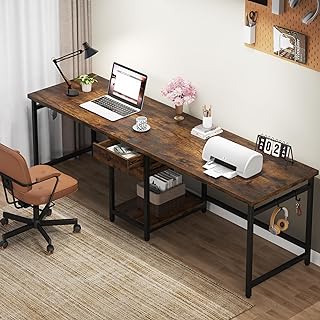


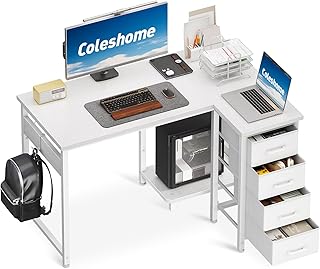


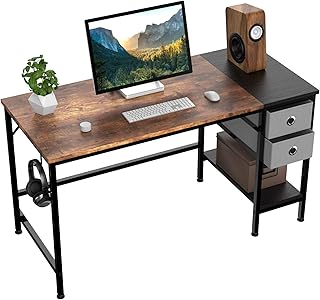


Choosing a study table is about more than finding a flat surface that fits a room. The right desk should provide enough usable workspace for the way you actually study, work or create, while also making sensible use of the available floor area. Screen size, books, notebooks, lighting, storage, cable management and seating position can all affect which design makes sense. For a student using a laptop for a few hours a day, a compact writing desk may be sufficient. Someone combining a monitor, laptop, textbooks and stationery may need substantially more depth and width. If the table will serve as a home-working station as well as a study desk, features such as cable routing, monitor space and an adjustable working height can become more important. Measure the intended location before comparing desks. Record the maximum width and depth available, but also consider the space needed to pull a chair backwards and move comfortably around the workstation. A desk that technically fits against a wall can still be impractical if a chair cannot be positioned properly. Make a realistic list of everything that normally needs to remain within reach. A laptop requires relatively little space, whereas a desktop monitor, keyboard, mouse, textbooks, A4 notebooks and desk lamp can quickly occupy a much larger working area. Desktop depth is particularly important for screen-based work. A very shallow desk may leave limited room between the user and a monitor once a keyboard and other equipment are positioned. Conversely, excessive depth can make frequently used stationery or books harder to reach. There is no single ideal width for every student. Compact desks can work well in bedrooms or smaller flats, while wider models provide greater flexibility for multiple devices and paperwork. Do not assume that a wider desk is automatically better. A large top can dominate a small bedroom and reduce usable circulation space. The best size is the largest practical work surface that leaves the room functional. Width determines how much can be placed side by side, whereas depth determines how much usable space is available from front to back. This distinction matters when choosing a desk for monitors or other equipment. Before buying, compare the stated depth with the footprint of your equipment. Check whether the manufacturer's dimensions include only the desktop or also account for rear cable-management structures, shelves and other components. A fixed-height desk should be considered alongside the chair that will be used with it. Ideally, the working position should allow the user to sit comfortably with the feet supported and the arms positioned naturally while using a keyboard or writing. Height-adjustable desks offer another approach because the working height can be changed rather than being determined entirely by the fixed frame. However, adjustability is useful only if the available height range suits the intended user and chair. Fixed-height study tables remain popular because they are straightforward and often provide a simple, stable workstation without the additional mechanisms associated with adjustable models. The main limitation is that the working height cannot normally be changed to accommodate different users or working positions. Height-adjustable models can be useful when a desk needs to serve more than one user or when the owner wants the flexibility to alternate between sitting and standing. Electric and manual adjustment systems are both available, with specifications varying considerably between models. When comparing an adjustable study table, look beyond the headline feature. Check the adjustment range, control method, frame construction, desktop dimensions, stated load capacity and whether the manufacturer's specifications explain how those figures were determined. Many contemporary desks use manufactured wood panels because they can provide a consistent surface and allow furniture to be produced in a wide variety of shapes and finishes. Common constructions include particleboard and medium-density fibreboard, sometimes combined with laminate, veneer or another decorative surface. For these desks, examine the construction rather than judging quality solely by appearance. Edge finishing, panel thickness, frame design and the method used to join the components can all affect the finished product. Solid-wood desks can offer a distinctive appearance and substantial construction, although the characteristics vary considerably between timber species and individual designs. Wood can also respond to changes in temperature and humidity, so normal care instructions should be followed. Metal is commonly used for desk legs and supporting frames. A metal frame can be paired with a wood-based, laminate or other desktop material. When comparing models, look at the overall frame design, the number and position of supports, joining points and any available manufacturer information about stability and load capacity. Glass desks can create a visually light appearance, but they require a different approach to everyday use and cleaning. Check the manufacturer's care guidance and the stated specifications before using heavy equipment or accessories. Storage can make a study area more organised, but integrated storage also changes the footprint and ergonomics of a desk. A drawer pedestal may be useful for stationery and documents, while open shelving can provide quick access to books. Check the storage dimensions carefully. A desk may have several drawers but still be unsuitable if they are too shallow for the items you need to store. Cable management has become increasingly relevant as study areas accommodate laptops, monitors, chargers, lamps, speakers and other electronics. A desk with a cable-management opening or dedicated routing system can help keep wires organised. However, cable management should not be treated as a substitute for planning the workstation. Check where sockets are located and determine which devices need permanent power. Also consider whether a monitor arm, docking station or other accessory will require a particular position on the desktop. A good workstation should support a comfortable working posture rather than forcing the user into an awkward position. Desk height, chair height, monitor placement, keyboard position and available legroom all interact. For computer-based study, the screen should be positioned so that the user does not have to spend long periods looking excessively upwards or downwards. The keyboard and mouse should be placed where the shoulders and arms can remain relaxed. A desk with sufficient depth also gives more flexibility when positioning a monitor at a comfortable viewing distance. Ergonomics is not determined by the desk alone. A suitable chair and sensible workstation setup are equally important, and individual requirements can vary. Stability is one of the most useful characteristics to investigate when comparing study tables. A desk can look attractive in photographs yet feel unsuitable if it moves noticeably during ordinary use. Look for clear manufacturer information about construction, materials, dimensions and load capacity. Where available, examine customer feedback for recurring comments about assembly, wobbling, damaged components or long-term stability, while remembering that individual reviews are not the same as controlled product testing. Many flat-pack study tables require home assembly. Before ordering, check how the furniture is supplied and whether assembly is expected to be completed by the buyer. Read the manufacturer's assembly information where available. Look for details about the number of components, tools required, recommended assembly procedure and whether the finished desk should be secured to a wall or otherwise anchored. Do not ignore the instructions simply because the construction appears straightforward. Incorrectly fitted fasteners can affect stability, alignment and the long-term condition of the furniture. Comparing desks purely by price or appearance can lead to a poor purchase decision. A more useful comparison considers the total combination of dimensions, construction, functionality and suitability for the intended room. A desk that occupies almost the entire room may provide an impressive work surface but leave insufficient space for the chair, storage or everyday movement. Measure the complete workstation rather than the desk alone. Width is often the first dimension shoppers notice, but insufficient depth can become frustrating when using a monitor, keyboard, books and paperwork together. Photographs can make furniture look substantially different from its real-world proportions. Always check the numerical dimensions and compare them with the room and equipment. Drawers, shelves and support bars can reduce the available space underneath the desktop. Check the underside dimensions rather than assuming the entire area is available for your legs. A desk can become cluttered quickly when several charging leads and peripheral cables cross the work surface. Consider cable routing before committing to a particular design. Additional shelves, drawers and adjustment mechanisms are worthwhile only when they solve a genuine need. A simpler desk can be the better choice if it provides the right work surface and leaves more usable space in the room. A student desk generally needs to accommodate books, notebooks, stationery and, increasingly, a laptop or other digital device. Compact dimensions may be preferable in a bedroom, but enough depth should remain for comfortable reading and writing. University study can involve a mixture of digital work, textbooks, handwritten notes and extended project work. A desk with flexible workspace can therefore be more useful than one designed around a single device. If the same workstation is used for employment and study, prioritise versatility. Monitor space, cable management, comfortable working dimensions and sufficient storage may become more important than a highly compact design. Consider desks with a compact footprint, vertical storage or a simplified design. Measure carefully around beds, wardrobes and doors, because the theoretical desk dimensions do not represent the complete amount of floor space required. A laptop-only workstation can often use a smaller surface, although accessories such as an external keyboard, mouse, stand and second screen can substantially increase the required space. Desktop computers usually require more planning. The monitor, computer tower, keyboard, mouse, speakers and cables all need appropriate positions. If the computer tower is intended to sit beneath the desk, check the available clearance and ventilation requirements specified by the equipment manufacturer. For shoppers considering a sit-stand workstation, compare the mechanism rather than simply looking for the words “height adjustable”. Important specifications include the minimum and maximum working heights, adjustment method, stated load capacity, desktop dimensions and control arrangement. An electric model may be convenient for frequent adjustments, while a manual mechanism can offer a simpler alternative. The best option depends on how often the height will be changed and the user's requirements. Customer reviews can provide useful information that is not obvious from a specification sheet, particularly around assembly and day-to-day usability. However, reviews should be interpreted carefully. Where possible, read verified customer reviews alongside the technical specification instead of treating an overall star rating as a complete assessment. Well-known furniture and workstation brands can be useful starting points for comparison because their ranges often cover different sizes and configurations. Examples shoppers may encounter in the UK include IKEA, John Lewis, Habitat and FlexiSpot. Brand recognition should not replace product-level research. Different desks from the same manufacturer can use different materials, frames, dimensions and mechanisms, so compare the individual specification rather than assuming every model from a familiar brand offers the same construction. The cheapest desk is not necessarily the lowest-cost choice over its useful life, just as a premium desk is not automatically the best option for every student. Consider what you actually need before allocating your budget. Always compare the specification of each candidate at the price available from the retailer you are considering. Prices, promotions, delivery charges and availability can change. Good maintenance starts with following the manufacturer's care instructions for the specific materials and finish. Avoid using unsuitable cleaning products, excessive moisture or abrasive materials on surfaces unless the manufacturer explicitly states that they are appropriate. Furniture should be assembled and used according to the manufacturer's instructions. Where a desk or storage unit is supplied with wall-fixing equipment or anti-tip guidance, follow those instructions and use an appropriate fixing method for the wall construction. Keep heavy objects positioned in accordance with the manufacturer's guidance and avoid creating an unstable arrangement of books or equipment. Cables should also be routed so that they do not create unnecessary trip hazards. For 2026 buying decisions, the most useful approach remains specification-led rather than trend-led. A desk should be assessed according to the user's equipment, room, working habits and budget. Features such as height adjustment, cable management and integrated storage can be valuable, but only when they address an actual requirement. Before purchasing, check the latest product specification and retailer information because dimensions, configurations, prices and availability can change. If two desks appear similar, focus the comparison on construction, usable workspace, adjustability, storage, legroom and the manufacturer's stated specifications. There is no single best study table for everyone. The right choice depends on available space, intended use, required desktop area, storage needs, preferred height and budget. Compare the specifications of several suitable models rather than selecting solely on popularity or appearance. The best size is the one that provides enough usable workspace without overwhelming the room. Measure the available area first, then compare the desk's width, depth and height with the equipment and study materials you intend to use. It can be worthwhile if you need to change working height regularly, share the desk with different users or want a sit-stand setup. If the desk will remain at one height, a suitable fixed-height model may provide everything you need with less mechanical complexity. Yes. Depth affects how much usable space is available between the front edge and the back of the desk. It becomes particularly important when a monitor, keyboard, books and notebooks need to share the same workstation. Drawers are useful when you need concealed storage for stationery, documents or accessories. They are not essential, however, and their presence can reduce legroom or increase the desk's footprint. Choose storage according to what you actually need to keep close at hand. Not necessarily. Shelves can make excellent use of vertical space and keep books accessible, but they can also increase the overall footprint or make the desk visually heavier. Compare the storage capacity with the space available in your room. Check the desktop dimensions, monitor space, legroom, cable-management provisions, stated load capacity and the location of any shelves or drawers. If a computer tower will sit underneath the desk, check the available clearance and the computer manufacturer's ventilation requirements. Customer reviews can reveal recurring issues involving assembly, stability and everyday usability, but they should be considered alongside the manufacturer's specifications. Look for consistent patterns across multiple relevant reviews rather than relying on a single rating. There is no universal replacement interval. A well-maintained desk can remain useful for many years, while replacement may become appropriate when the structure is damaged, the surface is no longer suitable, the desk no longer meets the user's requirements or a safer and more practical workstation is needed. The strongest study table choice is rarely determined by one headline feature. Start by measuring the room, identify exactly what the workstation must accommodate and then compare construction, dimensions, storage, adjustability, stability and cable management. Use manufacturer specifications as the foundation of the comparison, then read relevant verified customer reviews to identify recurring practical considerations. Compare equivalent models across trusted retailers, check today's specifications and prices before making a decision, and make sure the final desk works with the chair, equipment and space you already have. For an independent buying decision, prioritise suitability over marketing language. A straightforward desk with the right dimensions and construction can be a better choice than a feature-heavy model whose additional functions are unnecessary for your study routine.
How to Choose the Best Study Table in the UK
Start With the Available Space
Think About What Will Sit on the Desktop
Study Table Size: Width, Depth and Height Explained
What Desk Width Should You Choose?
Why Desk Depth Matters
Desk Height and Seating Position
Fixed-Height Versus Adjustable Study Tables
Fixed-Height Desks
Height-Adjustable Desks
Materials Used in Study Tables
Engineered Wood and Wood-Based Panels
Solid Wood
Metal Frames
Glass and Other Desktop Surfaces
Storage: Drawers, Shelves and Cupboards
Cable Management for Modern Study Desks
Questions to Ask About Cable Management
Study Table Ergonomics: What to Check Before Buying
Stability and Build Quality
Features That Can Affect Stability
Assembly: An Often-Overlooked Buying Consideration
How to Compare Study Tables Fairly
Key Specifications to Put Side by Side
Common Study Table Buying Mistakes
Choosing the Largest Desk That Fits
Ignoring Depth
Buying on Appearance Alone
Forgetting Legroom
Overlooking Cable Routing
Assuming More Features Mean Better Value
Study Tables for Different Types of Users
For School and College Students
For University Students
For Home Workers Who Also Study
For Small Bedrooms
Study Tables for Laptops and Desktop Computers
Standing Desk Features Worth Comparing
How to Assess Customer Reviews Properly
Trusted Study Desk Brands to Compare
Budget, Mid-Range and Premium Considerations
How to Make a Study Table Last Longer
Study Table Safety and Practicality
A Practical Study Table Comparison Checklist
What Matters Most When Comparing Study Tables in 2026?
Frequently Asked Questions About Study Tables
Which is the best study table?
What size study table is best?
Is a height-adjustable study table worth buying?
Is desk depth important for studying?
Should a study table have drawers?
Are study tables with shelves better?
What should I check before buying a computer study desk?
How important are customer reviews?
How often should a study table be replaced?
Final Buying Advice